

This guide will show you how to change the difficulty settings on your V Rising server.
Click here to order your V-Rising server with Citadel Servers today!
1. Log in to your Citadel Servers Game Panel and stop your server.
2. Navigate to the Configuration Files tab, then open the ServerGameSettings file using the text editor.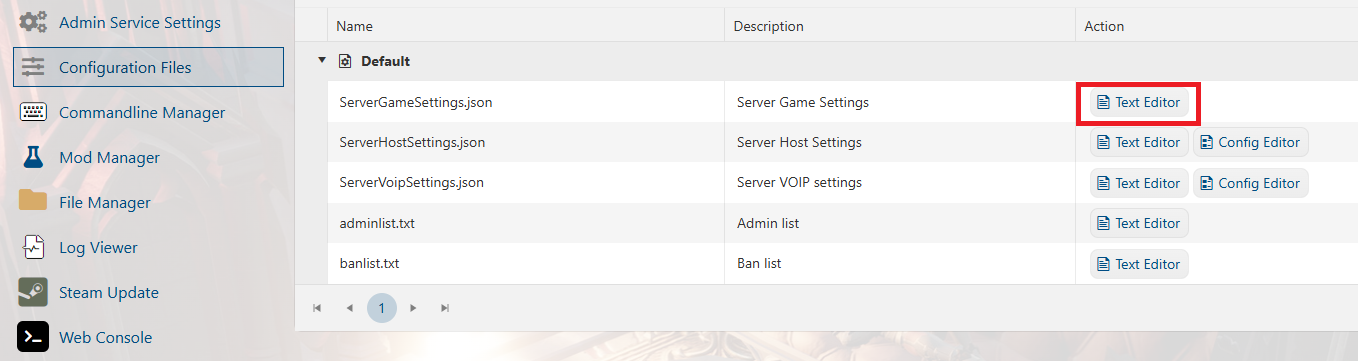
3. Locate the GameDifficulty line and adjust the value according to your preferred difficulty settings listed below.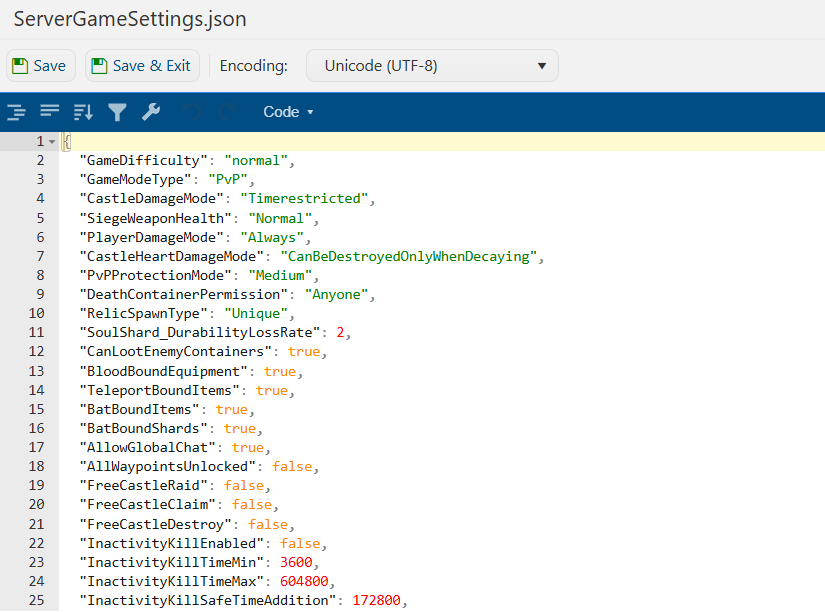
4. Click Save, then start your server and join to verify that the changes have been applied.
Difficulty Settings
| Setting | Description |
|---|---|
GameDifficulty |
Sets the difficulty preset. This can be adjusted from the Startup tab. Warning: Changing this will adjust other settings based on the selected difficulty preset. |
GameModeType |
Changes the server game mode to PvP or PvE. |
DeathContainerPermission |
Sets who can loot death containers. Accepted Values: AnyoneClanMembersOnlySelf |
BloodBoundEquipment |
Determines whether certain equipment items, such as weapons, remain in the player's inventory after death. |
TeleportBoundItems |
Prevents ore and other resources from being transported through waygates. |
InventoryStacksModifier |
Changes the maximum stack size for resources. Minimum: 0.25Maximum: 3 |
DropTableModifier_General |
Changes the amount of loot received from kills and chests. Minimum: 0Maximum: 3 |
SunDamageModifier |
Changes the time players can remain in sunlight before taking damage. Lower values provide more time. Minimum: 0Maximum: 3 |
CastleDecayRateModifier |
Changes how quickly castles without Blood Essence decay. Minimum: 0Maximum: 3 |
CastleBloodEssenceDrainModifier |
Changes how quickly Castle Hearts consume Blood Essence. Minimum: 0.1Maximum: 3 |
BuildCostModifier |
Changes the cost of building structures and crafting stations. Minimum: 0Maximum: 3 |
RecipeCostModifier |
Changes the cost of recipes within crafting stations. Minimum: 0Maximum: 3 |
CraftRateModifier |
Changes how long items take to finish at crafting stations. Minimum: 0.25Maximum: 6 |
RefinementCostModifier |
Changes the cost of refined resources, such as wood needed for planks. Minimum: 0Maximum: 3 |
RefinementRateModifier |
Changes how long materials take to refine at buildings such as the Sawmill. Minimum: 0.25Maximum: 6 |
DismantleResourceModifier |
Changes the amount of resources returned when dismantling objects. Set to 1.0 for a 100% material refund.Minimum: 0Maximum: 1 |
ServantConvertRateModifier |
Changes how quickly servants convert in their coffins. Minimum: 0.25Maximum: 6 |
RepairCostModifier |
Changes the cost of repairing equipment. Minimum: 0Maximum: 3 |
For further server configuration settings, you can view the full guide here: Server Configuration for your V Rising Server.
Did the above information not work for you?
Please click here to contact our support via a ticket.