

This guide will show you how to configure Shroud Curse Settings on your Enshrouded Server
Not a client yet? Order an Enshrouded Server today with Citadel Servers
The Shroud Curse is one of the gameplay mechanics that makes exploring the Shroud in Enshrouded more challenging. Players can become afflicted with the curse when attacked by certain enemies within the Shroud, adding another layer of difficulty to combat and exploration. Depending on your server's difficulty settings, this mechanic can make expeditions more demanding, particularly for players who frequently explore dangerous areas or engage in combat with Shroud-afflicted enemies. Fortunately, Enshrouded dedicated servers provide configurable gameplay options that allow you to adjust how frequently players receive the Shroud Curse. You can choose between different difficulty levels depending on the type of experience you want to provide. For example, selecting Easy disables the Shroud Curse mechanic, allowing players to explore and fight enemies without worrying about receiving the additional curse effect. Alternatively, keeping the setting at Normal preserves the standard gameplay experience, while selecting Hard doubles the likelihood of players receiving the curse when attacked by applicable enemies. Customizing this setting is particularly useful for server owners who want to accommodate different playstyles and preferences. If you are hosting a casual server for friends or players who prefer a more relaxed adventure, disabling the curse can make exploration less punishing. On the other hand, maintaining the default setting or increasing the difficulty can provide an additional challenge for players who enjoy more demanding survival and combat encounters. In this guide, we will walk you through the process of configuring Shroud Curse settings on your Enshrouded server using the Citadel Servers Game Panel. You will learn how to locate the appropriate server configuration file, identify the curseModifier parameter, and change its value to match your preferred gameplay experience. We will also explain the available configuration options and how each one affects the Shroud Curse mechanic. Before making any changes, we recommend stopping your server and creating a backup of your existing configuration file. This helps protect your current settings and allows you to restore them if necessary. Additionally, keep in mind that individual gameplay settings require the server's difficulty preset to be set to Custom. Otherwise, the selected difficulty preset may override your customized values. Once you have updated the configuration and saved your changes, restart your server to apply the new settings. With these adjustments, you can tailor the Shroud Curse mechanic to your community's preferences while preserving the rest of your server's gameplay experience. Whether you want to remove the curse entirely or retain the added challenge, configuring this setting gives you greater control over how players experience the dangerous regions of Enshrouded.
Configuring Shroud Curse Settings
1. Log in to your Game Panel and navigate to your service.
2. Before making any modifications, stop the server from running by clicking the Stop button.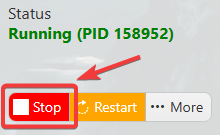
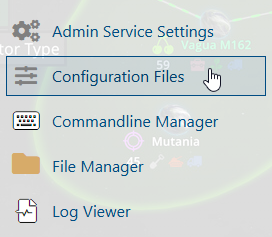
3. Navigate to the Configuration Files section.
4. Open the Text Editor and locate the curseModifier parameter. Modify its value according to your preferences to customize the gameplay experience on your server.
| Setting | Preset |
Easy |
Disables Shroud Curse |
Normal |
Default |
Hard |
Double Chance from Normal |
5. After editing, click the Save button to apply the changes.

Did the above information not work for you?
Please click here to contact our support via a ticket.
