

This guide will help you learn how to Modify Respawn Settings for your ICARUS Server
Rent an Icarus Server with Citadel Servers Today
In Icarus, dying is an expected part of survival, but the way players return to the game can have a significant impact on the overall experience. Whether you are running a private server for a small group of friends or managing a dedicated server for a larger community, adjusting the respawn settings allows you to tailor how players recover after death and how much of a setback dying should be. By default, ICARUS uses specific server settings that determine aspects of the respawn experience. Depending on your server configuration, you may be able to adjust options related to where players respawn, the penalties associated with death, and other gameplay behaviors that affect what happens after a player dies. Changing these settings can make survival more forgiving for casual groups or create a more demanding experience for players who want greater consequences for mistakes. Modifying respawn settings can also be useful when configuring a server around a particular playstyle. For example, a group focused on exploration may prefer settings that reduce downtime and allow players to get back into the action quickly. On the other hand, players looking for a more challenging survival experience may want stronger death penalties or more restrictive respawn behavior. Before making any changes, it is important to understand where your ICARUS server stores its configuration and which settings control the respawn system. Server configuration files may contain numerous gameplay options, so changing the wrong value can result in unexpected behavior or prevent the server from loading correctly. Creating a backup of your current configuration before editing it is therefore recommended. In this guide, we'll walk you through how to modify the respawn settings for your ICARUS server. We'll cover where to find the relevant configuration options, how to safely edit them, and what to check after restarting the server. By the end, you'll have a better understanding of how to customize the respawn experience to suit the type of ICARUS server you want to run.
Changing Respawn Settings
1. Log in to your Game Control Panel and navigate to your service.
2. Before making any changes, ensure that your server is fully stopped.
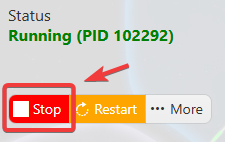
This helps prevent configuration changes from being overwritten or reverted to their default values.
3. Navigate to the Configuration Files tab to access your server’s configuration settings.
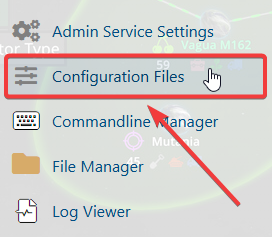
4. In the Configuration Files section, locate the serversettings.ini file, then click Text Editor to open and modify the server settings.

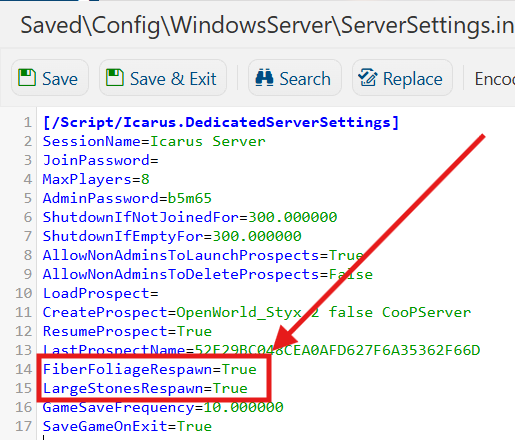
5. In the configuration file, locate the FiberFoliageRespawn and LargeStonesRespawn settings and adjust the respawn settings according to your preferred server configuration and gameplay requirements.
| Setting | Value | Description |
|---|---|---|
| FiberFoliageRespawn | True | False |
Controls whether all the fibrous plants in the world are restored to fully-grown plants that can be collected again when revisited later. |
| LargeStonesRespawn | True | False |
Controls whether large harvestable stones and rock nodes are restored and can be collected again when revisited later. |
6. Once you have finished editing the settings, click the Save button to apply the changes to your server.