
This guide will show you how to adjust the Max Players on your Enshrouded Server
Not a client yet? Order an Enshrouded Server today with Citadel Servers
Adjusting the maximum player count on your server allows you to control how many players can join and play together at the same time. Whether you're hosting a small server for a few friends or managing a larger community, setting an appropriate player limit can help ensure the server provides the experience you want. In this guide, we'll show you how to adjust the maximum number of players on your Enshrouded server and explain what to consider when choosing the right player limit for your server.
Adjusting the Player Count on Your Enshrouded Server
1. Log in to your Game Panel and navigate to your service.
2. Before making any modifications, stop the server from running by clicking the Stop button.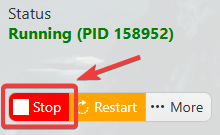
3. Navigate to the Configuration Files section.

4. Open the Text Editor and locate the Slot Count setting. Enter the desired number of player slots to define how many players can join your server simultaneously.
(Note: The maximum number of players you can configure is determined by the number of player slots included in your service plan. You can only set the Slot Count up to the number of slots you have purchased.)
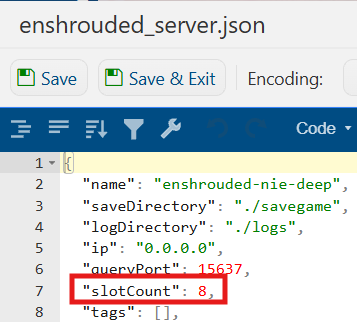
5. After editing, click the Save button to apply the changes.

Did the above information not work for you?
Please click here to contact our support via a ticket.