This guide will show you how to remove or Ban Players on your Barotrauma Server
Click here to order your Barotrauma server from Citadel Servers today!
As a server administrator, you may occasionally need to remove players who are disrupting gameplay, violating server rules, or otherwise negatively affecting the experience for others. Barotrauma provides built-in moderation tools that allow authorized administrators to kick players from the server or ban them from rejoining. In this guide, we'll show you how to kick or ban players on your Barotrauma server, including the available moderation commands and how to use them effectively. These tools can help you maintain a fair, organized, and enjoyable environment for everyone on your server.
Kicking and Banning Players
1. To access and modify the respawn settings, first join the server with administrator privileges.
2. Press F3 on your keyboard to open the console, where you can enter server administration and moderation commands.
3. Enter the appropriate server command in the console based on the action you want to perform. Ensure that the command and player information are entered correctly before executing it.
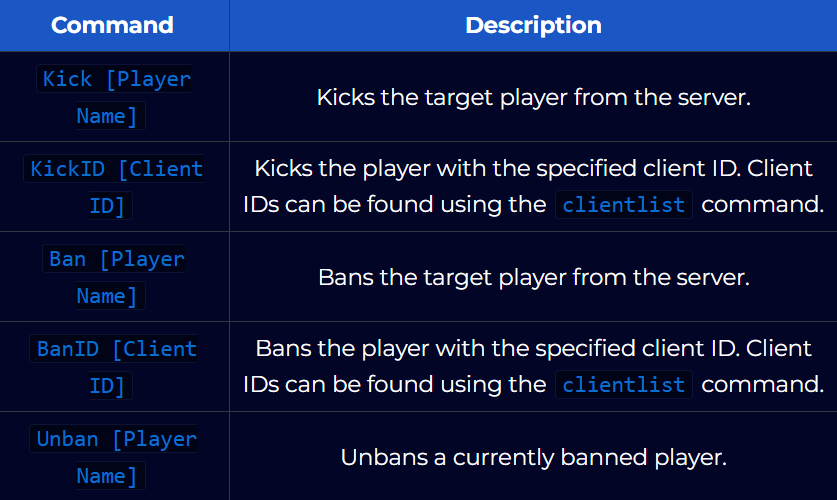
4. After entering the command, follow the prompts displayed in the console to provide a reason for the action and, when applicable, specify the ban duration.
Review the information carefully before confirming the command.
Did the above information not work for you?
Please click here to contact our support via a ticket.