

This guide will help you learn how to Instantly Travel Between Worlds on Your Hytale Server.
Click here to order your Hytale server with Citadel Servers today!
One of the most exciting features of running a Hytale server is the ability to explore multiple worlds without limits. Whether you’re managing different biomes, setting up custom adventures, or simply hopping between creative builds, instant travel between worlds makes the experience seamless and fun. Instead of manually moving files or restarting sessions, Hytale’s commands and server tools allow you to teleport across worlds in just a few steps. In this guide, we’ll walk you through how to instantly travel between worlds on your Hytale server, explain the commands you’ll need, and share tips to keep your gameplay smooth and immersive. By the end, you’ll be able to jump between worlds effortlessly and unlock the full potential of your server.
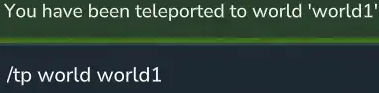
Teleporting Between Worlds on your Hytale Server
1. Log in to your Game Control Panel and navigate to your service.
2. Navigate to the Web-Console Tab.

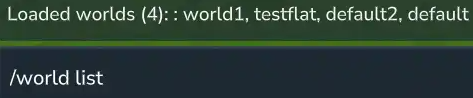
3. In the Web-Console tab, run the following command:
| Permission | Description |
hytale.teleport.command. |
The main permission to allow teleport subcommands. |
hytale.command.teleport.world |
Allows the /tp world <name> command. |
hytale.universe.command.world |
The main permission to allow world subcommands. |
hytale.universe.command.world.list |
Allows the /world list command. |
Please click here to contact our support via a ticket.
