This guide will show you How to Set Up Custom Starter Kits on Your Project Zomboid Server
Click here to order your Project Zomboid server with Citadel today!
Starter kits are a useful feature in Project Zomboid that allows server administrators to provide new players with a predefined set of items when they create a character and join the world for the first time. These items can include essential survival supplies, such as food, water, weapons, tools, and other equipment that help players get started. By configuring custom starter kits, you can tailor the initial gameplay experience to match your server's difficulty, progression system, and overall survival rules. Whether you're running a cooperative survival server, a roleplaying community, or a multiplayer world with increased difficulty, customizing starter kits gives you greater control over how players begin their journey. For example, you can provide basic supplies to help newcomers survive their first few days, offer specialized equipment for specific gameplay styles, or keep starting resources limited to maintain a challenging and balanced survival experience. A carefully configured starter kit can also make your server more welcoming to new players without removing the core survival challenges that make Project Zomboid engaging. In this guide, we'll walk you through how to set up custom starter kits on your Project Zomboid server by locating and modifying the appropriate server configuration files. You'll learn how to enable the starter kit feature, specify the kit you want players to receive, and customize the starting items according to your preferences. We'll also cover important considerations to keep in mind when applying these changes to ensure your configuration works as intended. Before making any changes, we recommend stopping your server and creating a backup of your existing configuration files. This helps protect your current settings and allows you to restore them if anything goes wrong. Once you've finished configuring your starter kit, save your changes and restart the server if required. Keep in mind that starter kits generally apply when a player creates a new character, so changing the configuration may not automatically grant the updated items to existing characters.
Enabling and Customizing Starter Kits
1. Log in to your Game Control Panel.
2. Before making any modifications, stop the server from running by clicking the Stop button.

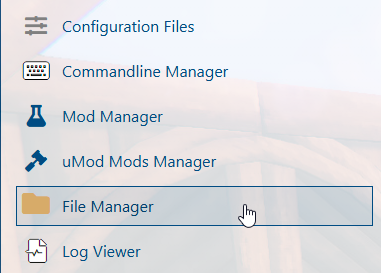
3. Navigate to the File Manager section.
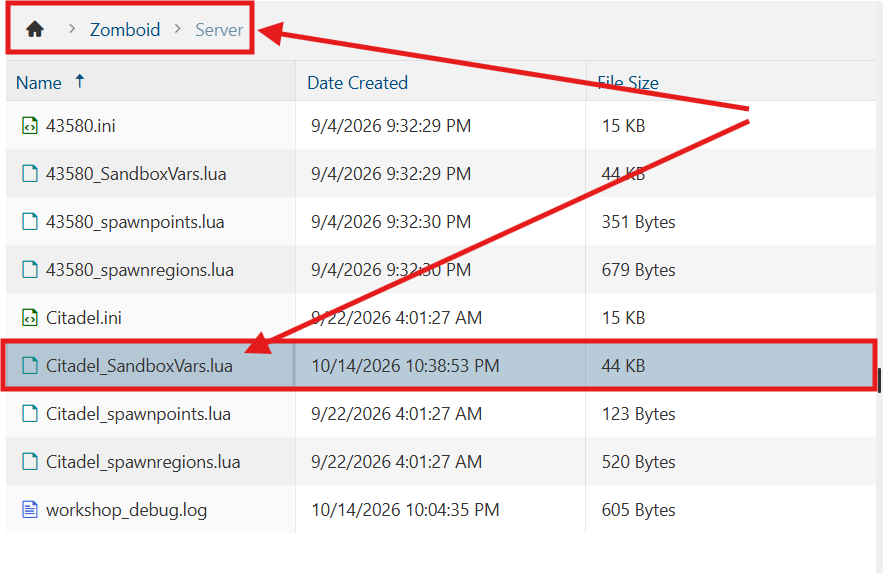
4. Navigate to the /Zomboid/Server directory and locate the [SaveName]_SandboxVars.lua file, replacing [SaveName] with the name of your server's save.
5. In the file, locate the StarterKit parameter and adjust its value to true.

6. After editing, click Save to apply the changes.

You can now start playing on your server.
Did the above information not work for you?
Please click here to contact our support via a ticket.