

This guide will show you how to enable PvP Combat on your Project Zomboid Server
Click here to order your Project Zomboid server with Citadel today!
Project Zomboid offers a challenging survival experience where players must manage resources, avoid zombies, and work together to stay alive. However, if you want to introduce a more competitive multiplayer experience, enabling Player vs. Player (PvP) combat allows players to fight one another, adding another layer of danger and strategy to your server. Whether you're creating a competitive survival environment, organizing battles between groups, or allowing players to defend themselves against other survivors, configuring PvP is an important step toward customizing your server's gameplay. In this guide, we'll walk you through how to enable PvP combat on your Project Zomboid server by adjusting the appropriate server configuration settings. You'll learn where to find the relevant configuration file, which setting to modify, and how to apply the changes so that players can engage in combat with one another. These adjustments allow you to tailor your multiplayer environment to suit your community's preferred playstyle, whether you want a more hostile survival world or a server where player encounters are just as dangerous as the zombie threat. Before making any changes, we recommend stopping your server and creating a backup of your current configuration files. This helps protect your existing settings and makes it easier to restore them if needed. Once you've updated the PvP setting, save the configuration and restart your server for the changes to take effect. Keep in mind that enabling PvP changes the player-combat rules, so it's a good idea to inform your community before introducing the feature. The guide will also cover the difference between enabling PvP globally and allowing players to control their own PvP status through the Safety System. Understanding these options will help you choose the right configuration for your server, whether you prefer unrestricted combat or a more controlled environment where players can decide when to engage in fights.
Enabling Player vs. Player Combat
1. Log in to your Game Control Panel.
2. Before making any modifications, stop the server from running by clicking the Stop button.

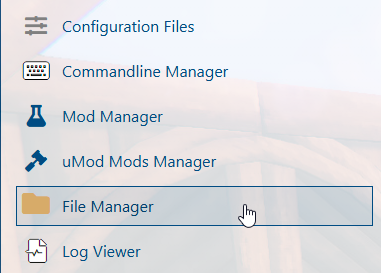
3. Navigate to the File Manager section.
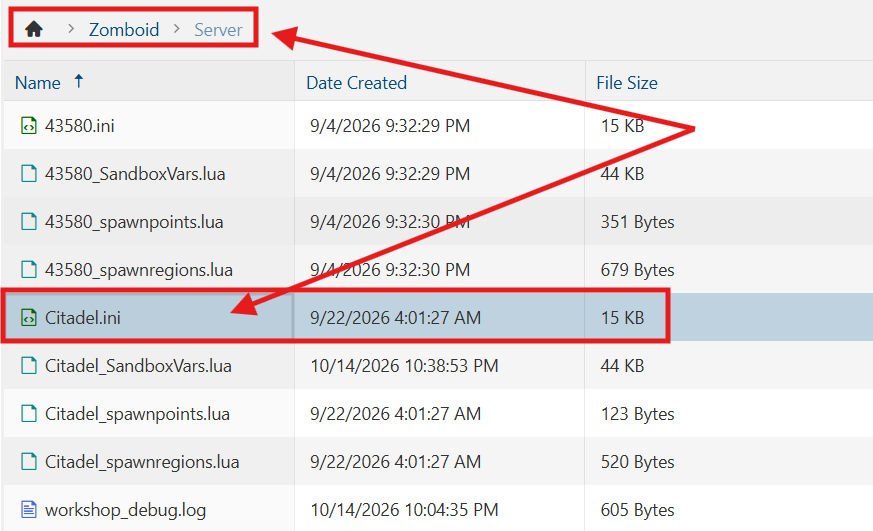
4. Navigate to the /Zomboid/Server directory and locate the [SaveName].ini file, replacing [SaveName] with the name of your server's save.
5. In the file, locate the PVP= parameter and adjust its value to true.

6. After editing, click Save to apply the changes.

You can now start playing on your server.
Did the above information not work for you?
Please click here to contact our support via a ticket.