

This guide will show you how to adjust the Experience Rate on your Project Zomboid Server
Click here to order your Project Zomboid server with Citadel today!
The experience rate in Project Zomboid determines how quickly players earn experience points (XP) and level up their skills as they survive the zombie apocalypse. Adjusting this setting on your dedicated server allows you to customize the pace of character progression, making it easier or more challenging for players to develop their abilities. Whether you want to create a relaxed multiplayer experience where players can quickly master essential survival skills or a hardcore world where every level requires considerable time and effort, configuring the XP rate helps you tailor the gameplay to your community's preferences. Project Zomboid features a variety of skills that players can improve through different activities, including combat, crafting, gathering resources, farming, and vehicle maintenance. By modifying the experience multiplier, you can influence how quickly players progress through these skills and unlock higher levels of proficiency. A higher multiplier generally allows players to earn XP faster, reducing the time needed to develop their characters, while a lower multiplier slows progression and encourages a more gradual survival experience. Your server's XP settings are typically stored in the sandbox configuration file, named <ServerName>_SandboxVars.lua. Depending on your Project Zomboid build, the setting may use XpMultiplier for Build 41 or a global multiplier configuration for Build 42. Before making changes, it is important to identify the correct setting for your server version to ensure your adjustments take effect as expected. In this guide, we will walk you through how to locate the relevant configuration file, adjust the experience multiplier, and apply your changes. Whether you want to double XP gain, accelerate skill progression for a casual server, or slow down leveling for a more demanding survival experience, these steps will help you customize character progression to match your community's needs. We recommend stopping your server and creating a backup of the configuration file before editing it, then saving your changes and restarting the server to apply them.
Configuring EXP Rates
1. Log in to your Game Control Panel.
2. Before making any modifications, stop the server from running by clicking the Stop button.

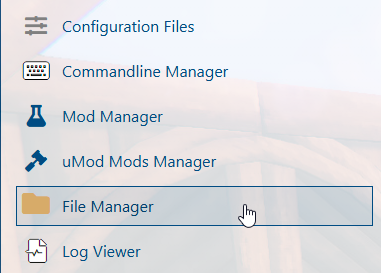
3. Navigate to the File Manager section.
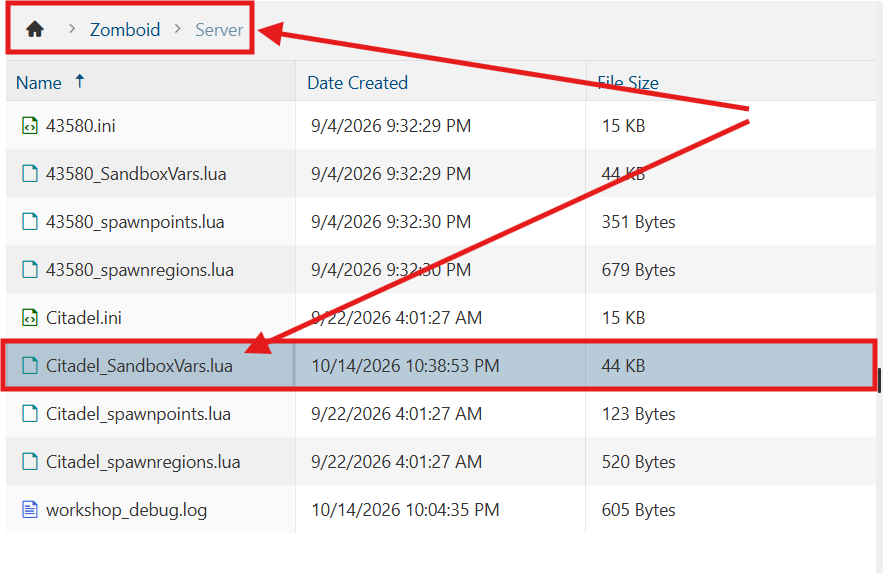
4. Navigate to the /Zomboid/Server directory and locate the [SaveName]_SandboxVars.lua file, replacing [SaveName] with the name of your server's save.
5. In the configuration file, set GlobalToggle to true to enable the global XP multiplier. Then, adjust the Global value to your desired experience rate.
Adjust the individual multipliers for each skill to customize its experience gain rate. These values stack with the global multiplier, affecting the total XP rate for each skill.

(Note: For example, if the global multiplier is set to 2.0 and an individual skill multiplier is also set to 2.0, the skill will receive four times the normal XP gain (2.0 × 2.0 = 4.0).
6. After editing, click Save to apply the changes.

You can now start playing on your server.
Did the above information not work for you?
Please click here to contact our support via a ticket.