
How to Host a Mount & Blade II: Bannerlord CO-OP Server – Step-by-Step Guide
Want to experience Calradia together with friends? Hosting your own Bannerlord CO-OP server gives you complete control over your multiplayer campaign, allowing you to customize gameplay, install compatible mods, and create a persistent adventure for your community.
This guide explains how to host your own Bannerlord CO-OP server and why Citadel Servers is an excellent choice for reliable game hosting.
Step 1: Choose a Reliable Hosting Provider
Bannerlord CO-OP is significantly more demanding than standard multiplayer because it synchronizes campaign progress between multiple players while supporting server-side mods.
When selecting a hosting provider, consider the following:
Performance: Modern Ryzen processors and NVMe SSD storage help maintain smooth campaign synchronization and faster loading times.
Stable Network: Low latency minimizes delays during battles, movement, and world synchronization.
Easy Management: A web-based control panel makes server configuration, updates, and restarts simple.
Mod Support: Full file access allows you to install and manage the Bannerlord CO-OP mod and any required dependencies.
24/7 Support: Technical assistance is available whenever you need help with setup or troubleshooting.
Citadel Servers provides all of these features, delivering enterprise-grade hardware optimized for Bannerlord CO-OP hosting.
Step 2: Order Your Bannerlord CO-OP Server
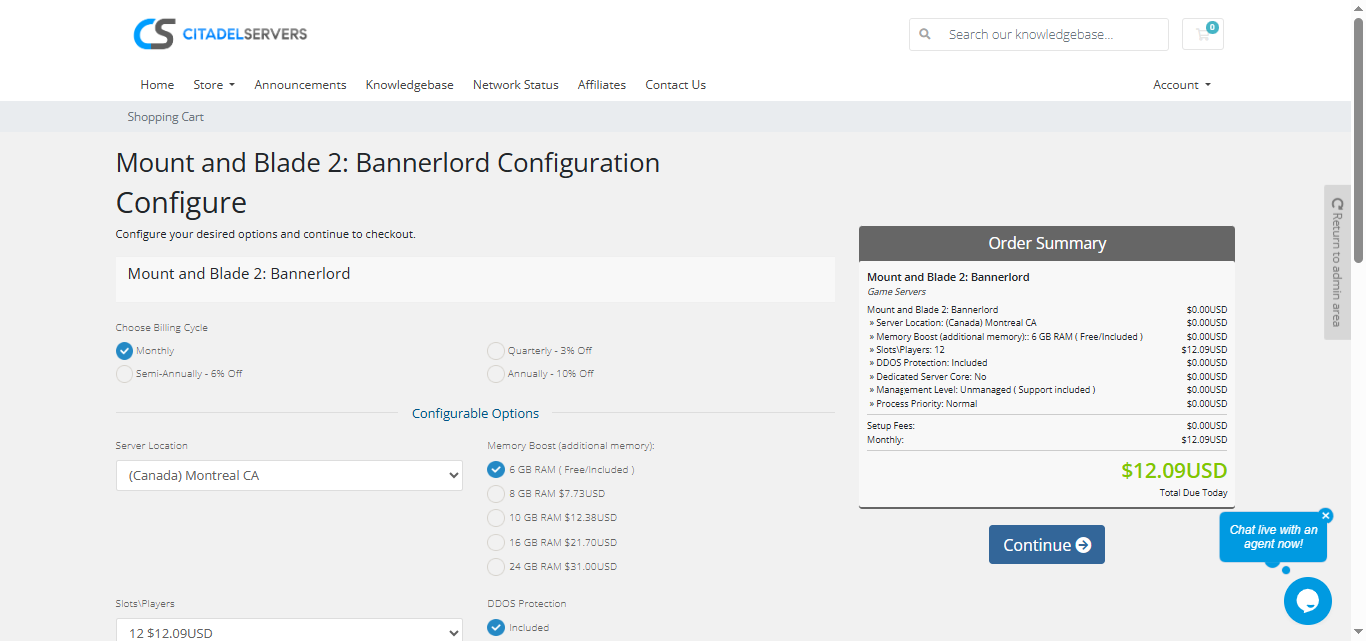
Getting started with Citadel Servers only takes a few minutes:
1. Visit the Mount & Blade II: Bannerlord Server Hosting page.
2. Choose the number of player slots for your campaign.
3. Select the server location closest to your players.
4. Customize any optional upgrades or add-ons.
5. Complete your order and your server will deploy automatically.
You'll receive your Game Panel login information shortly after deployment.
Step 3: Install Bannerlord CO-OP and Configure Your Server
After your server is deployed:
Log into your Game Panel.
Install the required Bannerlord CO-OP server files and any required dependencies.
Configure your server name, password, administrator settings, and campaign options.
Upload additional compatible mods if desired and verify your load order before starting the server.
Restart the server after making configuration changes to apply your settings.
Step 4: Launch Your Campaign
Once configuration is complete, start your server from the Game Panel.
Share your server information with friends so they can connect through the Bannerlord CO-OP client.
Using the control panel, you can:
- Restart or stop the server
- Install or update mods
- Edit configuration files
- Monitor server status and logs
- Schedule maintenance and backups
Everything is managed through one convenient web interface.
Why Host Bannerlord CO-OP with Citadel Servers?
Citadel Servers provides the performance, flexibility, and reliability required to host a smooth Bannerlord CO-OP campaign. Whether you're playing with a few friends or building a larger community, our infrastructure is designed to keep your adventure running reliably.
What Makes Us Stand Out
Instant Deployment: Your server is automatically created after payment.
Ryzen Performance: High-frequency Ryzen processors and NVMe SSD storage deliver excellent performance for Bannerlord CO-OP.
Global Locations: Multiple worldwide datacenters help reduce latency for your players.
Full File Access: Install Bannerlord CO-OP, upload mods, and customize your server without restrictions.
Easy Server Management: Control updates, restarts, configuration files, and monitoring through the Game Panel.
Automatic Backups: Protect your campaign progress with backup options.
24/7 Expert Support: Our experienced support team is always available to assist with server setup and troubleshooting.
Whether you're planning a cooperative campaign with close friends or running a public multiplayer community, Citadel Servers gives you the tools and performance needed for a reliable Bannerlord CO-OP experience.
Order your Mount & Blade II: Bannerlord Server today