
How to Host an Astro Colony Server – Dedicated Server Setup Guide
If you want full control over your Astro Colony multiplayer experience, hosting your own dedicated server is the best way to build and manage your space colony exactly the way you want. Whether you're creating automated factories with friends, expanding interplanetary infrastructure, or running a long-term cooperative world, a dedicated server provides complete freedom and persistent gameplay.
This guide explains how to host your own Astro Colony server and why Citadel Servers is a reliable choice for high-performance multiplayer hosting.
Step 1: Choose a Reliable Hosting Provider
Astro Colony relies on persistent multiplayer progression, automation systems, and continuous world simulation, making stable hosting essential for smooth gameplay.
When selecting a hosting provider, consider these important factors:
Fast Hardware: High-performance CPUs and NVMe SSD storage help maintain smooth automation, fast loading times, and stable server performance.
Reliable Network: Low-latency infrastructure ensures smooth synchronization between players and reduces lag during gameplay.
Easy Management Tools: A clean control panel simplifies server setup, updates, backups, and configuration changes.
24/7 Technical Support: Access to experienced support staff ensures quick assistance whenever issues arise.
Citadel Servers delivers all of these features with optimized infrastructure designed specifically for multiplayer sandbox and automation games like Astro Colony.
Step 2: Order Your Astro Colony Hosting Plan
Getting started with Citadel Servers is simple:
1. Visit the Astro Colony hosting page.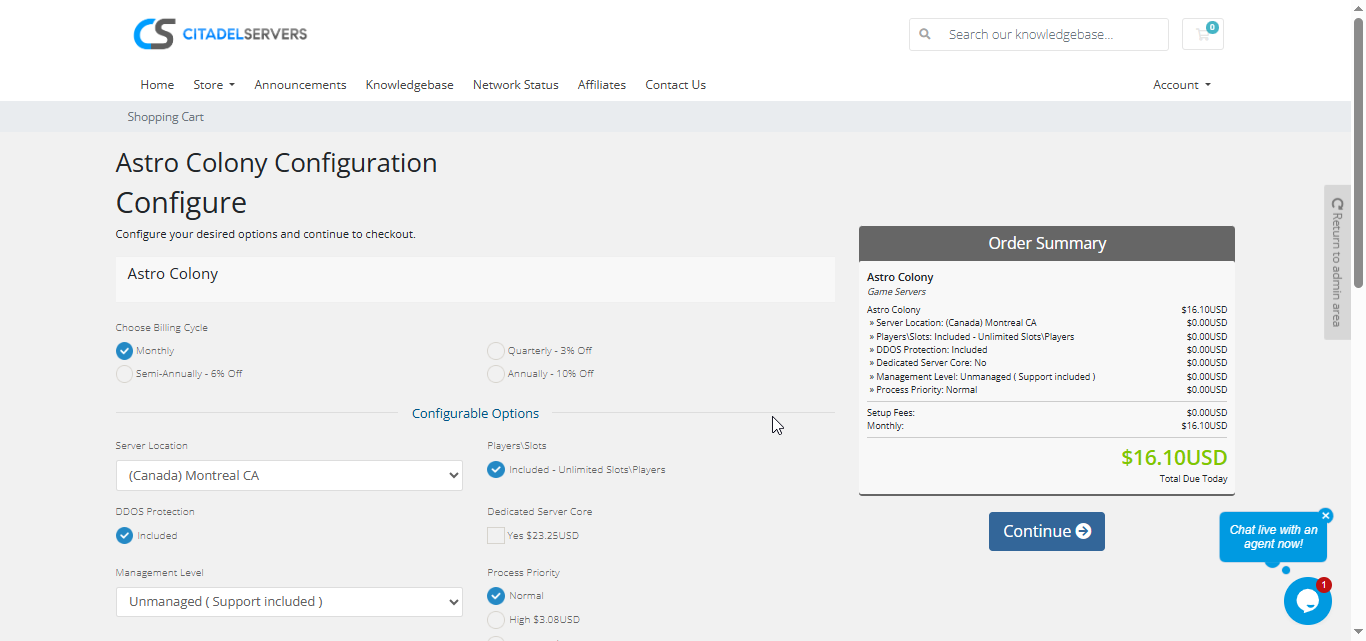
2. Choose the number of player slots you want for your colony.
3. Select a server location closest to your players for the best connection quality.
4. Add optional upgrades such as priority CPU processing or premium support.
5. Complete checkout and your server will deploy automatically within minutes.
You’ll receive your server login details and control panel access information by email shortly after deployment.
Step 3: Configure Your Astro Colony Server
Once your server is online, you can customize your multiplayer colony to match your preferred gameplay style.
Login to your Game Panel to manage your server settings.
Set your server name, password protection, and administrator permissions.
Adjust gameplay settings such as player limits, progression rules, automation preferences, and world behavior.
Configure save settings and performance options for long-term colony stability.
Upload custom files or supported mods through FTP/SFTP access if desired.
Step 4: Launch Your Colony
After configuration is complete, start your Astro Colony server directly from the control panel and invite players to join your universe.
Players can connect through the in-game multiplayer browser or by entering the server IP address manually.
You’ll also be able to:
- Monitor player activity and server performance
- Restart or update the server instantly
- Manage admin permissions and player access
- Schedule automated backups and maintenance
Everything is controlled through one convenient web-based interface.
Why Host with Citadel Servers
Hosting your Astro Colony server with Citadel Servers gives you the performance, flexibility, and reliability needed for uninterrupted multiplayer automation and exploration gameplay. Whether you're hosting a small private colony or a large cooperative world, our infrastructure is built to support persistent online environments.
What Makes Citadel Servers Stand Out
Instant Deployment: Your server deploys automatically immediately after payment so you can start building your colony quickly.
Enterprise-Grade Hardware: Dedicated resources and ultra-fast NVMe SSD storage provide smooth performance and fast save loading.
Global Server Locations: Multiple worldwide data centers ensure low latency and stable connectivity for all players.
Full File Access: Complete FTP access allows advanced customization and server management.
Automated Backups: Protect your progress with scheduled backups and easy recovery options.
Simple Server Management: Control updates, restarts, and settings from a user-friendly web panel.
24/7 Expert Support: Our support team is available around the clock to help resolve issues and keep your server online.
Build and expand your interstellar colony with the performance and reliability provided by Citadel Servers.
Order your Astro Colony Server now
```
