

This guide will help you learn about Customizing Player Capacity for Your Hytale Server.
Click here to order your Hytale server with Citadel Servers today!
Managing how many players can join your Hytale server is one of the most important steps in tailoring the multiplayer experience to your community. By customizing the maximum player capacity, you can decide whether your server will be a small, close-knit world for friends or a bustling hub filled with dozens of adventurers. Adjusting this setting not only helps balance performance and stability but also ensures that gameplay feels just right for the type of environment you want to create. In this guide, we’ll walk through how to change the max player limit on a Hytale server, explain why this setting matters, and share tips for choosing the right capacity based on your server’s goals. With a few simple tweaks, you’ll have full control over how your world is shared and enjoyed.
Managing Player Capacity on a Hytale Server
1. Log in to your Game Control Panel and navigate to your service.
2. Before making any modifications, stop the server from running by clicking the Stop button.

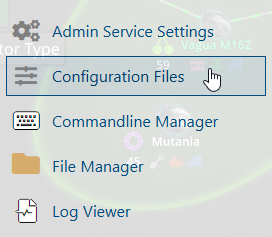
3. Navigate to the Configuration Files Tab.
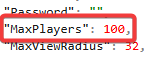
4. In the Configuration Files, look for the config.json file and look for the Max Players line.

Customize the Number of Players to your preferences.
5. After editing, click the Save button to apply the changes to your server.

Did the above information not work for you?
Please click here to contact our support via a ticket.
