

This guide will help you learn how to change the Death Penalty on your Hytale Server.
Click here to order your Hytale server with Citadel Servers today!
Running a Hytale server isn’t just about hosting, it’s about shaping the kind of gameplay experience you want your community to enjoy. One of the most impactful mechanics you can customize is the death penalty. By default, Hytale applies certain consequences when a player dies, such as losing items, experience, or respawning at a set location. However, server administrators have the power to adjust these rules to better fit their world’s theme, difficulty level, or roleplay style. Whether you want to make death more forgiving for casual adventurers, harsher for hardcore survivalists, or unique to your server’s lore, changing the death penalty allows you to fine-tune the balance between challenge and fun. This guide will walk you through the basics of modifying death penalty settings, explain the different options available, and provide tips for tailoring them to your community’s needs. By the end, you’ll understand not only how to configure these mechanics but also how to use them to reinforce the identity of your server, making every player’s journey feel intentional and immersive.
Changing the Death Penalty on your Hytale Server
1. Log in to your Game Control Panel and navigate to your service.
2. Before making any modifications, stop the server from running by clicking the Stop button.

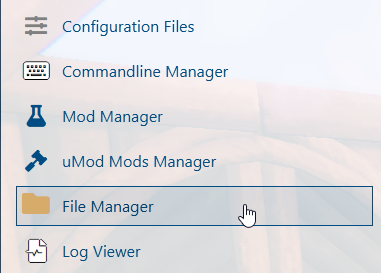
3. Navigate to the File Managers Tab.
4. Find the following directory: /universe/worlds/(your world) and look for the config.json file.
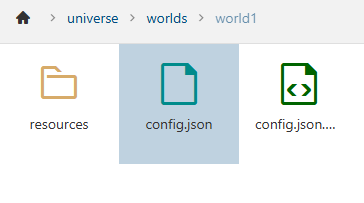
(NOTE: If a 'Death' line is already present, proceed directly to Step 6.)
5. In the config.json file, look for the "GameplayConfig" line, then hit enter.
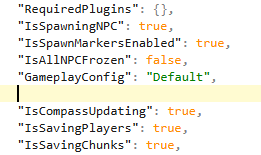
Enter the following command:
"Death": {
"RespawnController": {
"Type": "HomeOrSpawnPoint"
},
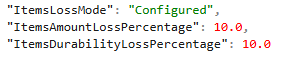
"ItemsLossMode": "Configured",
"ItemsAmountLossPercentage": 10.0,
"ItemsDurabilityLossPercentage": 10.0
},
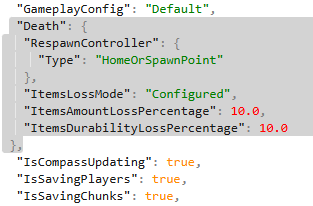
6. Next, configure the ItemLossMode Settings to your preferences.
| Setting | Description |
ItemsLossMode |
Sets the death penalty to
|
ItemsAmountLossPercentage |
Sets the number of items lost upon death. |
ItemsDurabilityLossPercentage |
Sets how much item durability is lowered on death. |
7. After editing, click the Save button to apply the changes on the server.

Did the above information not work for you?
Please click here to contact our support via a ticket.
