How to Host a Miscreated Server – Step-by-Step Guide for Survivors
If you’re ready to build your own post-apocalyptic world in Miscreated, hosting your own server gives you complete control over the environment. Customize loot, weather, base rules, AI behavior, and player access to create the perfect survival scenario for your community.
This guide explains how to host your Miscreated server and why Citadel Servers is a great choice for stability, customization, and high performance.
Step 1: Pick a Reliable Hosting Provider
Miscreated is a demanding survival game with a large map, dynamic weather, AI activity, and base building—all of which require strong performance. A reliable host ensures smooth gameplay and stable uptime even under heavy load.
When choosing your host, focus on:
Performance: High-speed CPUs and NVMe SSD storage help the world run smoothly as players build, explore, and engage in PvP.
Network Quality: Low latency ensures responsive combat, fast looting, and smooth player movement across the landscape.
Ease of Management: A good control panel makes editing configs, applying updates, and managing mods simple.
Support Availability: 24/7 expert support ensures you have help anytime an issue arises.
Citadel Servers offers optimized hardware and tools specifically designed to run resource-heavy survival titles like Miscreated.
Step 2: Order Your Hosting Plan
Once you’ve decided to host with Citadel Servers, getting started is simple:
1. Go to the Miscreated hosting page.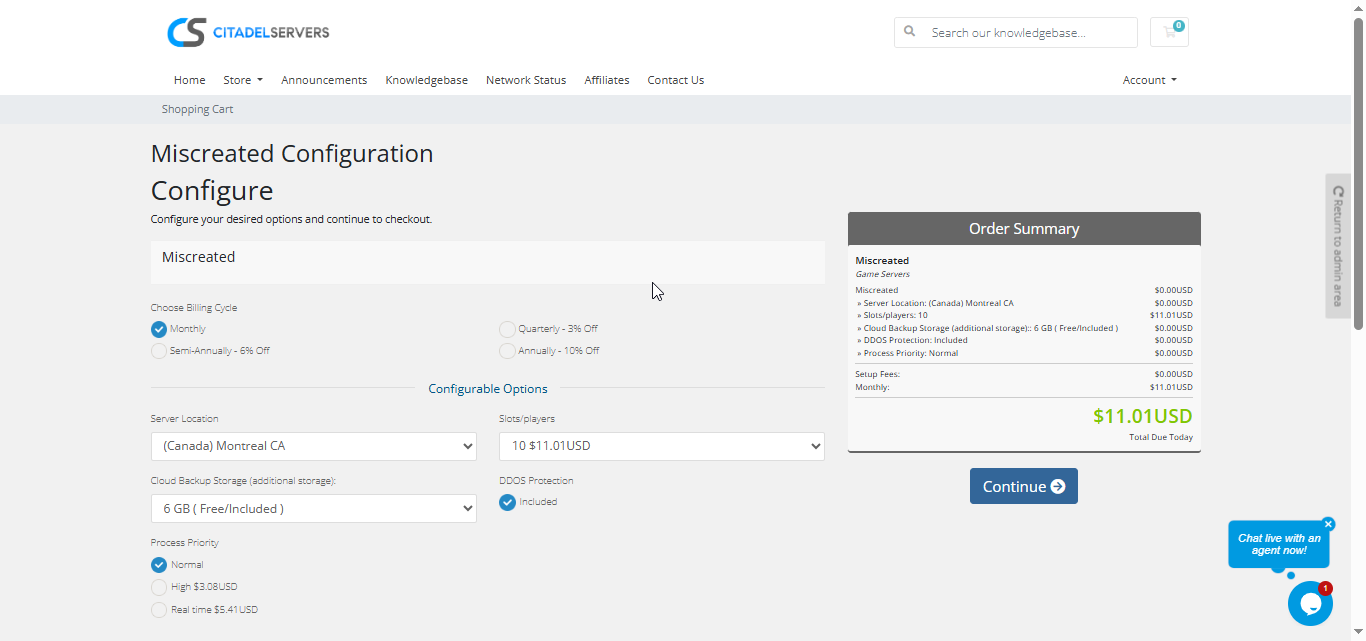
2. Choose how many player slots you want.
3. Pick your server location closest to your player base for the best ping.
4. Select any extras, like process priority, premium support, etc.
5. Proceed to checkout, once payment is confirmed, your server deploys automatically.
You’ll receive an email with your control panel login details and connection info within minutes.
Step 3: Configure Your Server
After deployment, it’s time to personalize your world:
- Follow our Quick Start Guide
Set your server name, password, and admin details.
Adjust gameplay settings such as loot spawns, weather cycles, player stamina, decay rate, and PvP rules.
Modify AI behavior including mutant difficulty, animal spawns, and NPC settings.
Upload or manage custom settings via the built-in File Manager or FTP/SFTP.
Edit configuration files such as server.cfg and hosting.cfg to fine-tune your world.
Enable mods or custom scripts depending on the style of gameplay you want to offer.
All configuration is handled through the Citadel Control Panel, designed to support both new hosts and advanced administrators.
Step 4: Launch and Play
When your settings are ready, start your server from the panel and invite your friends.
Players can connect via the in-game server browser or by entering the server’s IP and port.
You can monitor activity, manage users, and restart your world at any time, all through the same web interface.
Why Host with Citadel Servers
Hosting Miscreated with Citadel Servers ensures your world runs smoothly and reliably, no matter how chaotic the apocalypse becomes.
What Makes Us Stand Out
Instant Setup: Your server deploys instantly after payment so you can start surviving right away.
High-Performance Hardware: Powerful CPUs and NVMe SSD storage ensure smooth gameplay even with many players and bases.
Global Data Centers: Choose the closest region to minimize ping and maximize performance.
Full Access & Customization: Upload files, edit configs, tweak gameplay, and fully customize your Miscreated world.
Easy Mod & Update Management: Update files and manage modifications directly from the control panel.
Automated Backups & Easy Restarts: Keep your world safe and manage restarts effortlessly.
24/7 Expert Support: Our technical team is always available to help you troubleshoot issues and keep your server functioning at its best.
Citadel Servers gives you the stability, control, and performance needed to host your own post-apocalyptic adventure.
Order your Miscreated Server now