How to Host a Minecraft Server – Step-by-Step Guide for Builders & Adventurers
If you’re ready to take full control of your Minecraft world, hosting your own server is the best way to create a custom survival, creative, or modded gameplay experience. You can install plugins, manage worlds, adjust rules, and invite friends to explore, build, and survive with you.
This guide explains how to host your Minecraft server and why Citadel Servers is an ideal partner for reliable and flexible hosting.
Step 1: Pick a Reliable Hosting Provider
Minecraft can be very demanding depending on your world size, player count, plugins, and mods. A stable, high-performance server ensures smooth gameplay without lag spikes or downtime.
When choosing your host, look for:
Performance: Fast CPUs and NVMe SSDs help handle chunk generation, redstone machines, mobs, and modpacks.
Network Quality: Low ping ensures responsive gameplay, quick block placement, and smooth combat.
Ease of Management: A strong control panel helps manage versions, modpacks, plugins, worlds, and backups easily.
Support Availability: 24/7 support is essential, especially when managing modded setups or plugin issues.
Citadel Servers provides all of these, offering optimized hosting perfect for Vanilla, Spigot, Paper, Forge, Fabric, and large modpacks.
Step 2: Order Your Hosting Plan
Once you’ve decided to host with Citadel Servers, getting started is simple:
1. Go to the Minecraft hosting page.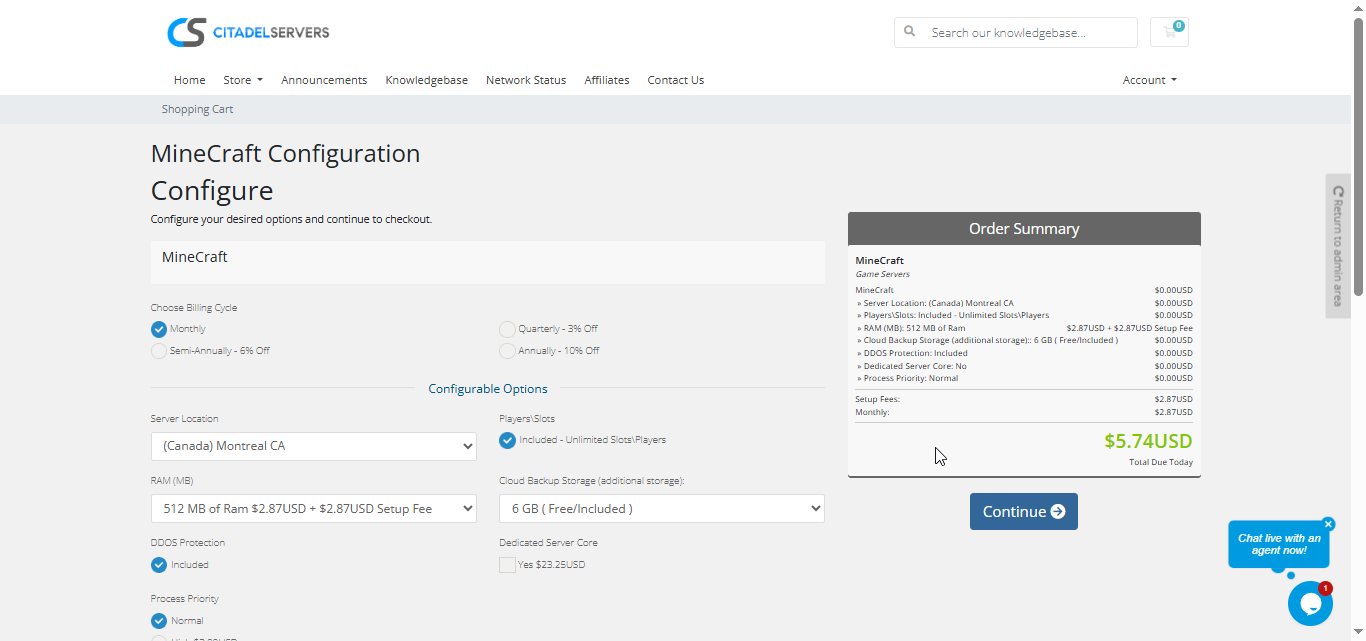
2. Choose how many player slots you want.
3. Pick your server location closest to your player base for the best ping.
4. Select any extras, like process priority, premium support, etc.
5. Proceed to checkout, once payment is confirmed, your server deploys automatically.
You’ll receive an email with your control panel login details and connection info within minutes.
Step 3: Configure Your Server
After deployment, it’s time to personalize your world:
- Follow our Quick Start Guide
Set your server name, difficulty, whitelist, and basic settings.
Choose your version: Vanilla, Paper, Spigot, Forge, Fabric, or even full modpacks.
Install plugins or mods using the built-in Mod Manager, or upload files via FTP/SFTP.
Manage worlds—create new ones, import existing worlds, or switch between multiple maps.
Adjust core configs such as server.properties, Paper settings, and mod configs.
Enable backups and schedule automatic restarts to keep your server running smoothly.
All of this can be managed directly through the Citadel Control Panel, designed for both beginners and experienced admins.
Step 4: Launch and Play
When your settings are ready, start your server from the panel and invite your friends.
Players can connect via the in-game server browser or by entering the server’s IP and port.
You can monitor activity, manage users, and restart your world at any time, all through the same web interface.
Why Host with Citadel Servers
Hosting your Minecraft world with Citadel Servers gives you the performance, flexibility, and reliability needed to keep your adventures running smoothly.
What Makes Us Stand Out
Instant Setup: Your server deploys automatically after payment so you can start playing within minutes.
High-Performance Hardware: Fast CPUs and NVMe SSDs help handle large worlds, heavy plugins, and modded servers smoothly.
Global Data Centers: Multiple worldwide locations ensure the best connection for you and your community.
Full Access & Mod Freedom: Upload any plugins, mods, modpacks, or custom world files without restrictions.
One-Click Mod & Version Manager: Install modpacks, switch versions, or configure mods with ease.
Automated Backups & Easy Restarts: Protect your builds and progress with regular backups managed through the panel.
24/7 Expert Support: Our team is always available to assist with configuration, performance tuning, and troubleshooting.
Citadel Servers gives you everything you need to build, explore, and survive in your own custom Minecraft world.
Order your Minecraft Server now